How to enable CORS on Axway API & use postman to verify if the CORS is enabled
How to enable CORS on an Axway API Gateway frontend API and verify it with Postman.
2 min read
After a long break from the blog posting, I have decided to start posting again.
In this post we will demo how to enable CORS in Axway API Gateway and use Postman to verify whether the Cross-Origin Resource Sharing (CORS) are enabled on the API or not.
You need to enable the CORS setting on the API, if you are planning to call the API from javascript which is running in browser. For more details on CORS, please check below links
https://developer.mozilla.org/en-US/docs/Web/HTTP/CORS
To enable CORS on Axway API
By Default, CORS are enabled for all domains for the frontend API in Axway. You can verify the setting on Frontend API -> Inbound -> Advance tab
Enable CORS from all domains

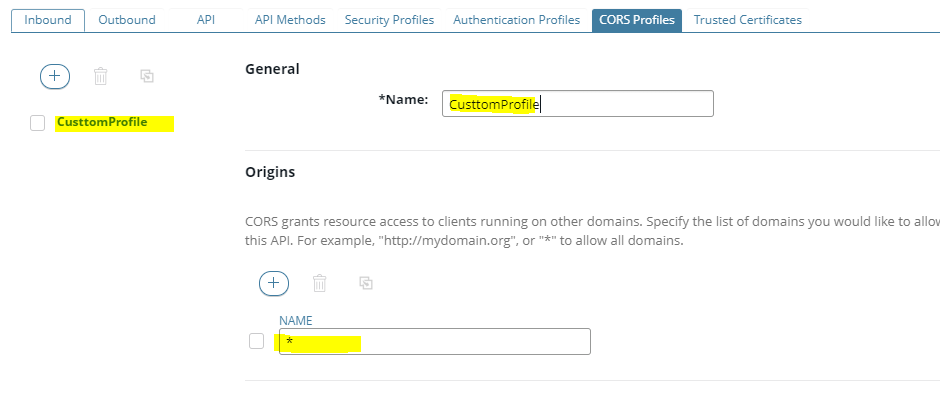
If you want to restrict or configure specific CORS setting, you can create the CORS profile on frontend API. Click on CORS profile, Add a new CORS profile, with ORIGIN URL or ALLOWED HEADER's
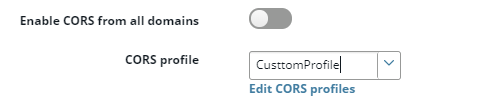
You will need to select the configured profile, please refer below screenshot.
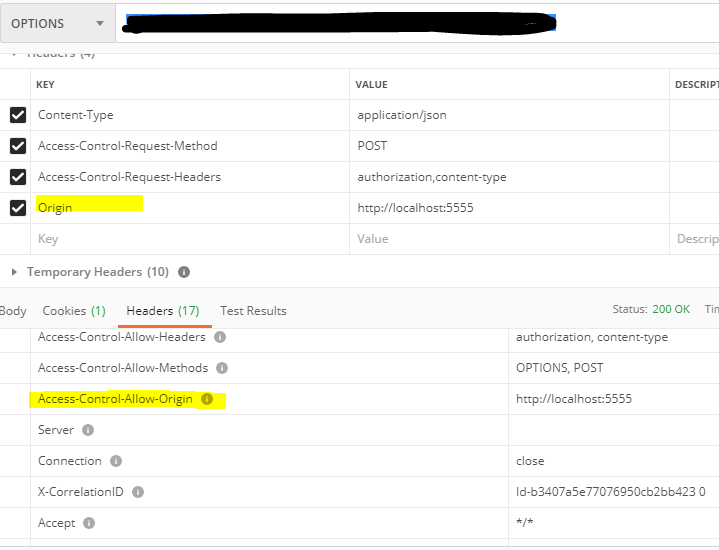
To test or verify is the CORS is enabled: In order to verify the CORS, browser first make the OPTIONS call to the API. Based on the headers in the response, browser will decide whether to allow the actual call or block the call.
Thus, we need to make the option call from the POSTMAN to verify if we are getting the required header's in response.
Make a note, that while calling OPTIONS call from POSTMAN, you will need to set Origin header to the hostname that is allowed on the API. Based on the configuration on the API, if the hostname is allowed, it will return the same hostname in Access-Control-Allow-Origin response header.
If you are able to get the Access-Control-Allow-Origin header in response, the browser should allow the Javascript call to go through.