Boomi
Groovy
Integration
Combine or Merge XML documents in Single XML using Boomi & Groovy
1 min read
In this small post will try to show how you can merge multiple XML Documents in Boomi.
Consider following scenario where you have to merge Document 1 & 2 in a new Document 3
Document 1:
<?xml version="1.0" encoding="UTF-8"?>
<tns:OutputParameters xmlns:tns="http://sample.com">
   <tns:Book>
      <tns:Names>
         <tns:Name>XZY World</tns:Name>
      </tns:Names>
      <tns:Authors>
         <tns:AuthorID>12354</tns:AuthorID>
      </tns:Authors>
   </tns:Book>
</tns:OutputParameters>
Document 2:
<?xml version="1.0" encoding="UTF-8"?>
<tns:OutputParameters xmlns:tns="http://sample.com">
   <tns:Book>
      <tns:Names>
         <tns:Name>ABC World</tns:Name>
      </tns:Names>
      <tns:Authors>
         <tns:AuthorID>53171</tns:AuthorID>
      </tns:Authors>
   </tns:Book>
</tns:OutputParameters>
To a Merged Document:
<?xml version="1.0" encoding="UTF-8"?>
<tns:OutputParameters xmlns:tns="http://sample.com">
   <tns:Book>
      <tns:Names>
         <tns:Name>XZY World</tns:Name>
         <tns:Name>ABC World</tns:Name>
      </tns:Names>
      <tns:Authors>
         <tns:AuthorID>12354</tns:AuthorID>
         <tns:AuthorID>53171</tns:AuthorID>
      </tns:Authors>
   </tns:Book>
</tns:OutputParameters>
Merging this in Boomi using Map shape is tricky because the elements are repeating and was not able to make it work even using cached documents in Map.
Thus, wrote below Groovy Script to implement the logic.
- Firstly, to simulate multiple documents, create a sub-process with a Return shape. Since the Return shape waits for all documents to arrive before returning them.
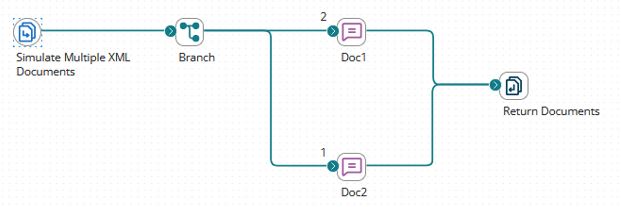
- Next, call the sub-process and pass the documents to a Data Process shape with a Groovy script.

Below is the Groovy Script:
import java.util.Properties;
import java.io.InputStream;
import org.jdom.input.SAXBuilder;
import org.jdom.Document;
import org.jdom.Element;
import org.jdom.Namespace;
import org.jdom.xpath.XPath;
import org.jdom.output.XMLOutputter;
import com.boomi.execution.ExecutionUtil;

InputStream is=null;
Properties props=null;

def getItems = { xml,tagname -> xml.'**'.findAll{it.name() == tagname} }

document1XML = new XmlSlurper().parse(dataContext.getStream(0));

props = dataContext.getProperties(0);

//For each document

for( int i = 1; i < dataContext.getDataCount(); i++ ) {

    document2XML = new XmlSlurper().parse(dataContext.getStream(i));

//Extract the node using above filer and insert in base document

    document1XML.Book.children().each {

        tag->

        getItems(document2XML,tag.name()).collect{ tag.appendNode(it.children())}
    }
}

//Seriealize it and assigned it to Boomi Document Context

mergedxmlStr=groovy.xml.XmlUtil.serialize(document1XML);

is = new ByteArrayInputStream(mergedxmlStr.getBytes("UTF-8"));

dataContext.storeStream(is, props);